

Have you ever joined a webinar or online lecture, only to spend the first five minutes listening to: "Can everyone see my screen?" or "Wait, let me hide this floating window so you can read the chart"?
We have all been there.
When you use general-purpose video conferencing tools for structured presentations, you are trying to fit a square peg into a round hole. Platforms built for team chat treat your slides like an afterthought—a casual window share buried beneath a grid of user avatars.
At Slideator, we believe great content deserves better. That is why we built our entire platform around a presentation-first philosophy.
In this post, we will explore what a presentation-focused live streaming platform actually means, why traditional video tools damage your audience engagement, and how Slideator elevates your content to center stage.
What is a "Presentation-First" Live Streaming Platform?
A presentation-first platform is a video broadcasting tool built entirely around the structure, flow, and visual hierarchy of a presentation deck.
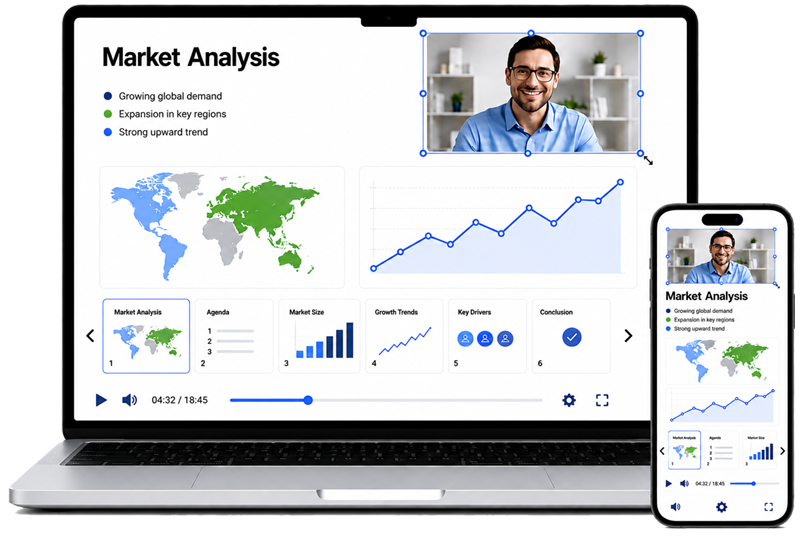
Instead of treating your desktop screen as a chaotic canvas, a presentation-focused system like Slideator locks onto your slides as the foundational anchor of the broadcast. Your webcam video, live chat, and interactive tools do not compete with your slides; instead, they integrate cleanly around them.
The Core Features of Slideator’s Presentation Focus
Slideator re-engineers the live streaming experience by putting your material at the heart of the interface. Here is how it changes the game for creators and viewers:
1. Native Workspace Integration (No More Screen Sharing)
With traditional tools, you must open PowerPoint or Keynote locally, share your desktop, and lose sight of your audience. Slideator replaces this clunky workflow. You upload your PowerPoint, PDF, or Keynote files directly into your browser-based workspace. The platform processes your deck natively, creating a crisp, lag-free visual anchor for your stream.
2. Intelligent Webcam Overlays
Your face matters for building trust, but it should never block your data. Slideator treats your webcam as a flexible, intelligent overlay. It embeds smoothly into the presentation layout, ensuring you remain connected with your audience without ever obstructing a single bullet point or chart.
3. Viewer-Driven Layout Control
Audiences learn differently. Slideator empowers your viewers by giving them control over their playback layout. If a slide contains a detailed diagram or heavy text, viewers can manually move, resize, or temporarily hide the presenter’s video frame. This unique feature ensures the layout always matches the viewer's learning needs.
4. Synchronized Markup and Virtual Whiteboards
When you draw, highlight, or annotate live on a Slideator stream, those markups are not just floating pixel overlays on a screen recording. Every annotation is mathematically synced and pinned directly to that specific slide.
5. Automated Slide-Indexed Navigation
The magic of a presentation-first system continues long after the live stream ends. Because Slideator understands the structure of your presentation deck, it automatically indexes your recorded video based on your slide changes. The system generates a clickable, interactive thumbnail menu. Future viewers can instantly skip to the exact slide or topic they need, bypassing hours of fluff.
Why Traditional Video Tools Fail Your Presentations
To understand the power of a presentation-focused platform, look at the compromises forced upon you by standard video software:
- The "Picture-in-Picture" Trap: In tools like Zoom or Teams, when you share a screen, your presentation is squeezed down to fit the viewer's window, while a massive black bar or a grid of faces eats up valuable screen real estate.
- Loss of Speaker UI: The moment you go full-screen with a slideshow on standard software, you often lose your live chat, your speaker notes, and your audience engagement trackers. You are essentially speaking into a void.
- Destructive Screen Real Estate: Notifications, desktop clutter, or private messages can accidentally flash across the screen during a general screen-share session, breaking professionalism and risking data privacy.
The Benefits: Why Presentation-Focus Matters
Shifting from a standard video room to a presentation-first environment unlocks immediate benefits for your brand, your school, or your business:
- Skyrocketing Retention Rates: When visual clutter is eliminated, audience cognitive load drops. Viewers stay focused on your message longer because they do not have to squint or fight with the UI to read your content.
- Seamless On-Demand Value: Most live webinars die in an archive folder because nobody wants to watch a sloppy, unindexed 60-minute replay. Slideator’s automated slide-by-slide indexing turns your live stream into an evergreen, searchable educational resource.
- Professional Brand Authority: By presenting within a clean, locked, branded interface, your webinars look like premium broadcasts rather than casual internal team syncs.
Conclusion: Stop Sharing Screens. Start Presenting.
Your content is too valuable to be treated as a background window. It is time to move past the era of messy screen sharing and embrace a platform that honors your hard work.
With Slideator’s presentation-first live streaming environment, you can capture your audience's full attention, keep your slides in pristine focus, and deliver an unmatched learning experience.
Ready to elevate your live streams? Sign up for a free Slideator account today and experience the power of presentation-focused broadcasting firsthand.