
Back to Blog
Published: August 8, 2026
Stop Sharing Screens. Start Presenting.
Screen sharing was built for a different era. It was designed so a colleague could watch you troubleshoot a spreadsheet, navigate a portal, or look at a quick document. It was never intended to be the primary medium for high-stakes presentations, online lectures, or product demonstrations.
Yet, every day, millions of presenters open Zoom, Teams, or Loom, click "Share Screen," and settle for a degraded experience.
It is time to move past screen sharing. It’s time to start presenting.
The Problem with "Screen Sharing"
When you share your screen on standard meeting software or video recorders, three major issues ruin the presentation:
-
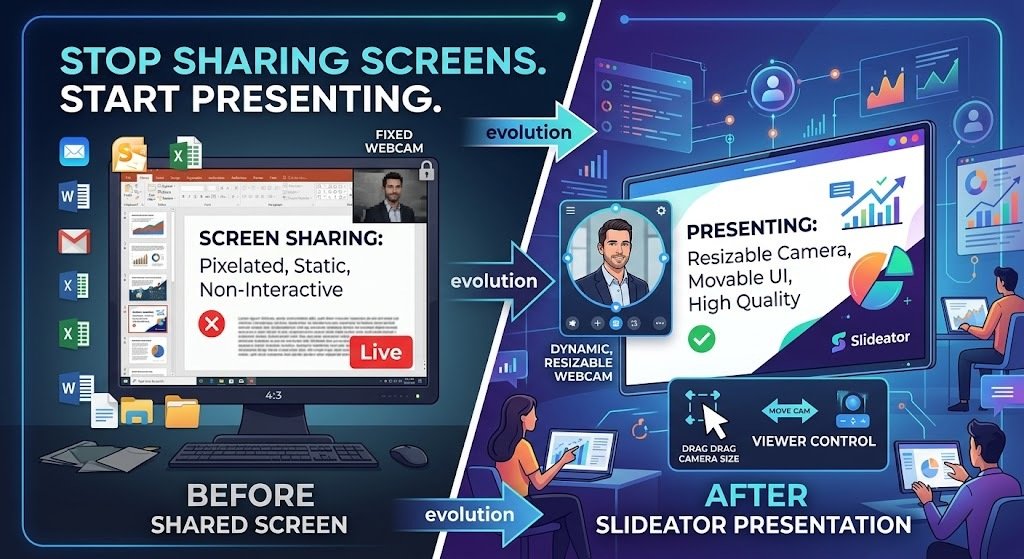
Resource Heavy & Blurry Text: Screen sharing broadcasts a compressed video feed of your entire monitor. High-resolution slides get pixelated, frame rates drop during animations, and viewer bandwidth gets crushed.
-
The "Floating Box" Trap: Most tools lock the presenter's video into a tiny, static rectangle in the corner. You are forced to choose between the audience seeing your slides or seeing your face—never both effectively.
-
Zero Viewer Control: Every single viewer is forced to watch the exact same fixed layout. If your face is covering critical text on a slide, the viewer has no way to move it out of the way.
Generic screen recorders treat your slides like flat background wallpaper. But slides aren't background wallpaper—they are structured content.
Slideator: Built Presentation-First
Slideator wasn't built to record your desktop. It was engineered specifically to process, host, and deliver presentation content.
Instead of capturing a noisy desktop feed, Slideator separates your slide deck and your camera into two independent, synchronized streams. This fundamental shift changes how presentations are recorded and watched:
| Feature | Generic Screen Sharers | Presentation Platform |
| Slide Quality | Compressed desktop video feed | Vector-sharp, full-resolution rendering |
| Camera Layout | Fixed box, non-customizable | Fully movable, resizable, hideable |
| Viewer Control | Passive (forced view) | Interactive (viewer controls UI live) |
| Bandwidth | Heavy desktop video stream | Optimized lightweight dual-stream assets |
Putting the Viewer in the Driver's Seat
Because Slideator processes your presentation assets natively on the client side, viewers get complete control over how they consume your content:
-
Resize & Move: Viewers can drag your camera frame anywhere on the screen if it blocks dense text or diagrams.
-
Hide on Demand: If a slide requires full focus, viewers can hide the camera with a single tap and bring it back when you're speaking again.
-
Crystal-Clear Text: Because slides are rendered cleanly alongside the camera stream, text and code snippets remain sharp on every screen size—from mobile phones to 4K monitors.
Upgrade Your Presentation Workflow
If you are creating online courses, training modules, research talks, or business proposals, stop sending recorded desktop shares. Give your audience an interactive, presentation-first experience where they control the view.
Ready to transform your presentation videos? Create your first interactive dual-stream session on Slideator today.